내 인생을 픽사 영화로 — AI 1분 영화 제작, A부터 Z까지Turning My Life into a Pixar-style Film — an AI one-minute movie, A to Z
유튜브 영상 하나(스토리 원본)와 제 목소리, 그리고 AI 도구 세 개로 69초짜리 인생 영화를 만들었습니다. 이 페이지는 그 전 과정의 기록입니다 — 실제로 쓴 프롬프트, 실제 설정값, 실제 비용, 그리고 실패담까지 전부요.One YouTube video (the story source), my own voice, and three AI tools became a 69-second film about my life. This page documents the entire process — the actual prompts, the actual settings, the actual costs, and the failures too.
완성작 「두 번 체크」 — 69.7초, 20컷, 픽사풍 3D. 내레이션은 제 목소리의 프로페셔널 클론입니다.The finished film, “Check Twice” — 69.7 seconds, 20 shots, Pixar-style 3D. The narration is a professional clone of my own voice.
준비물What you need
Claude CodeHiggsfield MCPElevenLabsffmpeg인생 이야기 하나one life story
코딩은 몰라도 됩니다. 전 과정이 Claude와의 대화로 진행됩니다 — AI가 파이프라인이고, 당신은 감독입니다.No coding required. The whole process is a conversation with Claude — the AI is the pipeline, you are the director.
STEP 1
스토리 — 원본에서 로그라인까지Story — from source to logline
시작은 제 유튜브 영상 「다 포기한 인생에서 억대연봉 되기까지」 하나였습니다. 영상의 자막(transcript)을 Claude에게 주고 물었습니다: "이걸 1분짜리 픽사 영화로 만든다면?"It started with a single YouTube video of mine. I gave Claude the transcript and asked: “If this were a one-minute Pixar film, what would it be?”
AI가 제안한 컨셉이 「두 번 체크(Check Twice)」였습니다 — 보드게임에서 무심코 반칙을 하다 친구에게 들킨 순간, "알렉스는 두 번 체크해야 돼~"라는 농담 한마디에 증명 중독의 인생 전체가 무너지고 다시 시작되는 이야기. 12분짜리 영상에서 감정의 급소 하나를 찾아내는 것, 그게 스토리 단계의 전부입니다.The concept the AI pitched was “Check Twice” — the moment I got caught cheating at a board game, and my friend’s teasing one-liner cracked open a whole life of proving-addiction. Finding the one emotional pressure point in a 12-minute video: that is the entire story step.
로그라인 · 훅 · 모티프 · 컬러 아크를 하나의 "스토리 바이블"로 정리 (모티프: 반복되는 '체크' — 게임 체크, 성적 체크, 마음 체크)Logline, hook, motif, color arc go into one “story bible” (the motif: recurring “checks” — game checks, grade checks, heart checks)
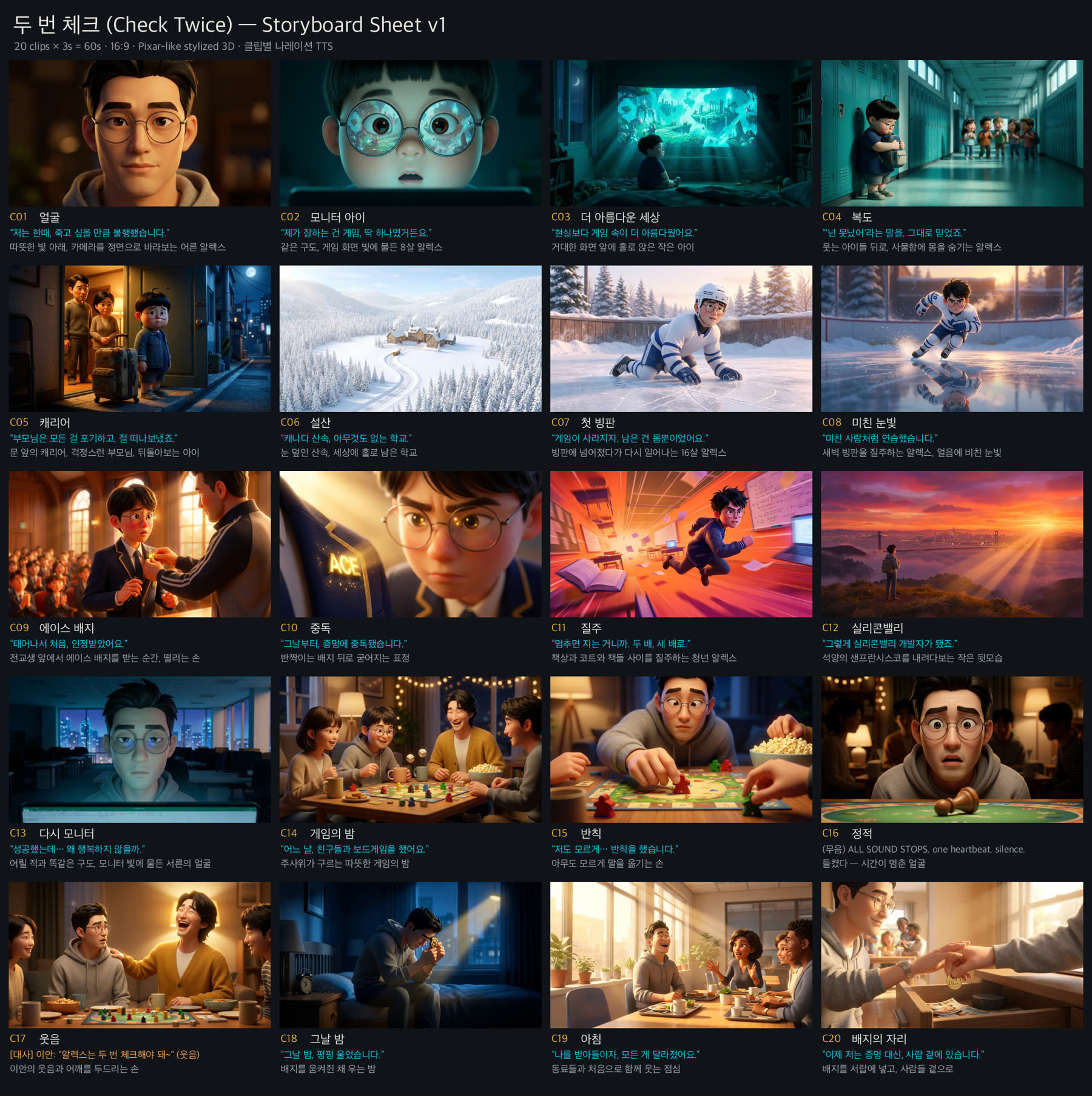
스토리보드 우선 원칙: 영화 전체를 20개의 컷으로 나누고, 컷마다 정지 이미지 1장 + 내레이션 1줄을 배정Storyboard-first rule: the film is divided into 20 shots, each assigned exactly one still image + one narration line
캐릭터 — 정체성 마커와 감독 노트 루프Characters — identity markers and the director’s-notes loop
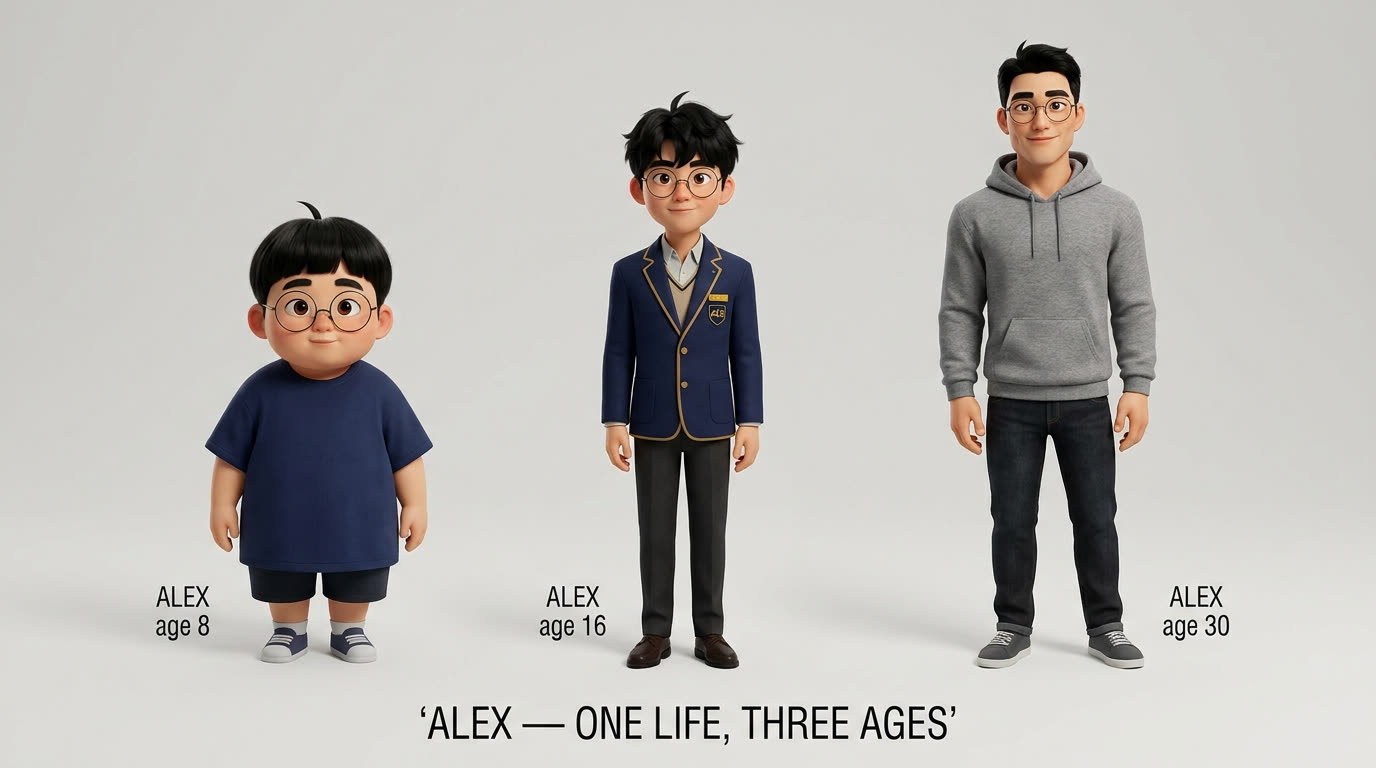
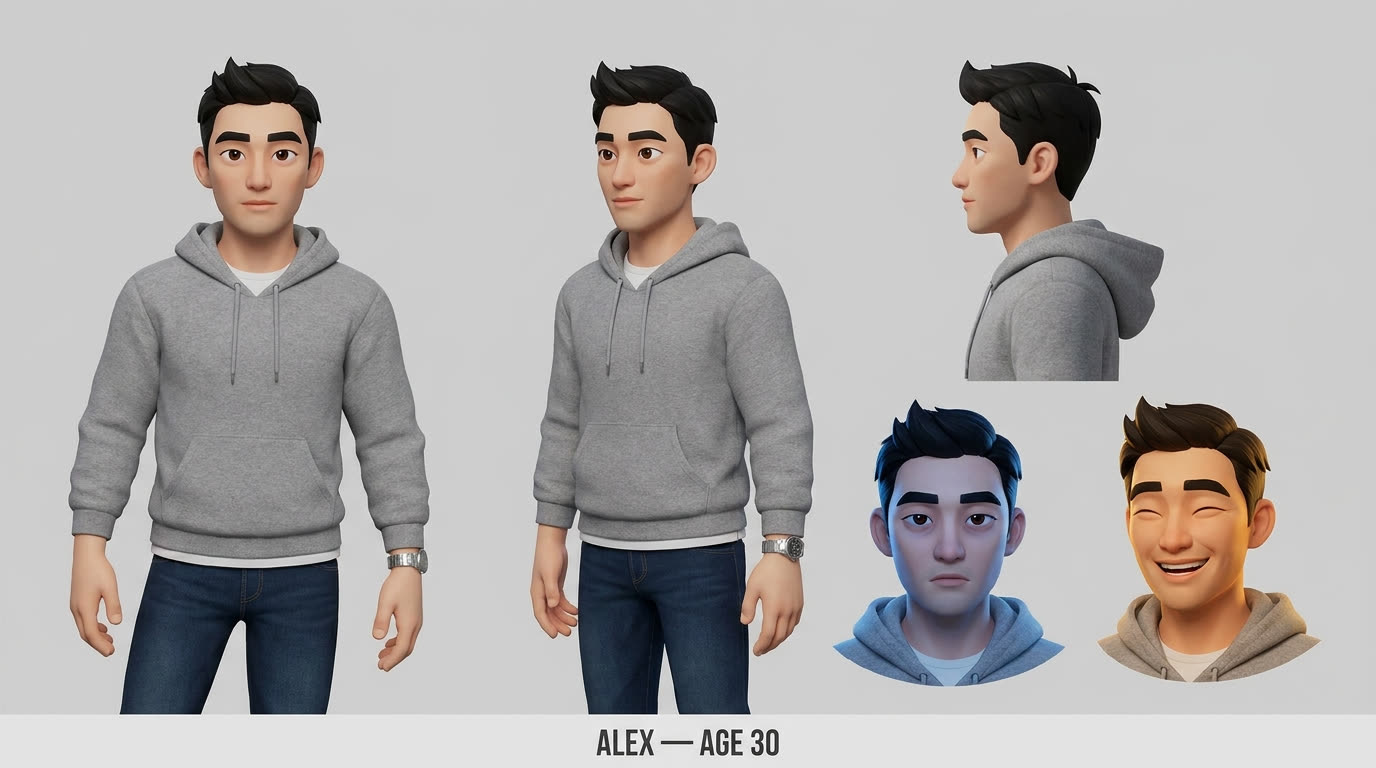
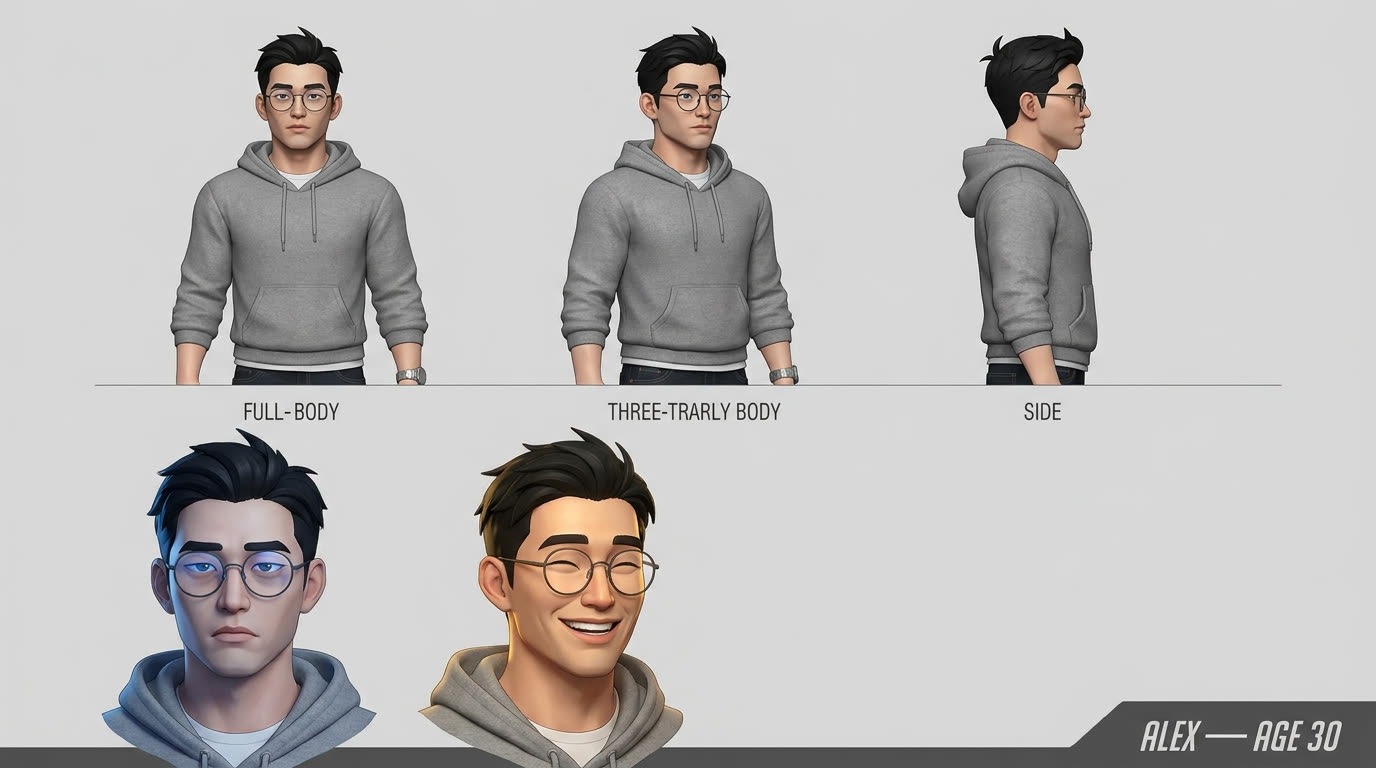
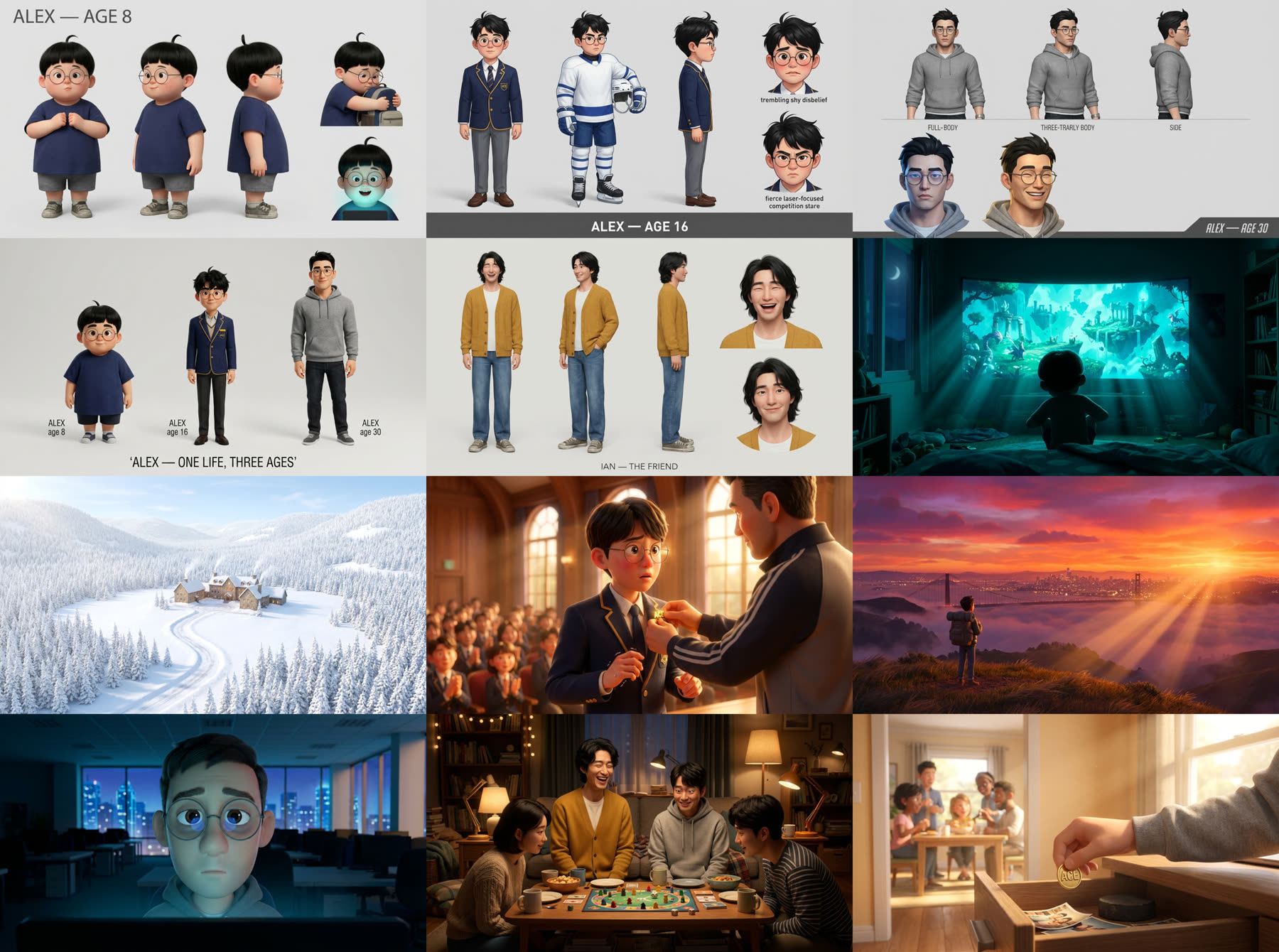
AI 영상의 최대 난제는 같은 얼굴을 유지하는 것입니다. 해법은 두 가지였습니다: ① 캐릭터마다 중립 배경의 프로덕션 시트(턴어라운드 + 표정)를 만들어 모든 생성의 레퍼런스로 첨부하고, ② 프롬프트마다 반복되는 시그니처 마커를 박아두는 것.The hardest problem in AI video is keeping the same face. Two fixes: ① build a neutral-background production sheet per character (turnaround + expressions) and attach it as reference media to every generation, and ② hard-code signature markers repeated in every prompt.
에이지 라인업 — 8살, 16살, 30살이 '같은 사람'으로 보이게 하는 시트. 나이가 바뀌어도 마커(동그란 안경, 눈썹, 가마)는 유지됩니다.The age lineup — ages 8, 16, and 30 reading as one person. The markers (round glasses, brows, cowlick) survive every age change.
v1 — 감독 노트 전v1 — before notesv3 — "안경은 해리포터처럼", "턱선 더 샤프하게" 반영 후v3 — after “Harry Potter glasses” and “sharper jawline”
핵심 루프The core loop
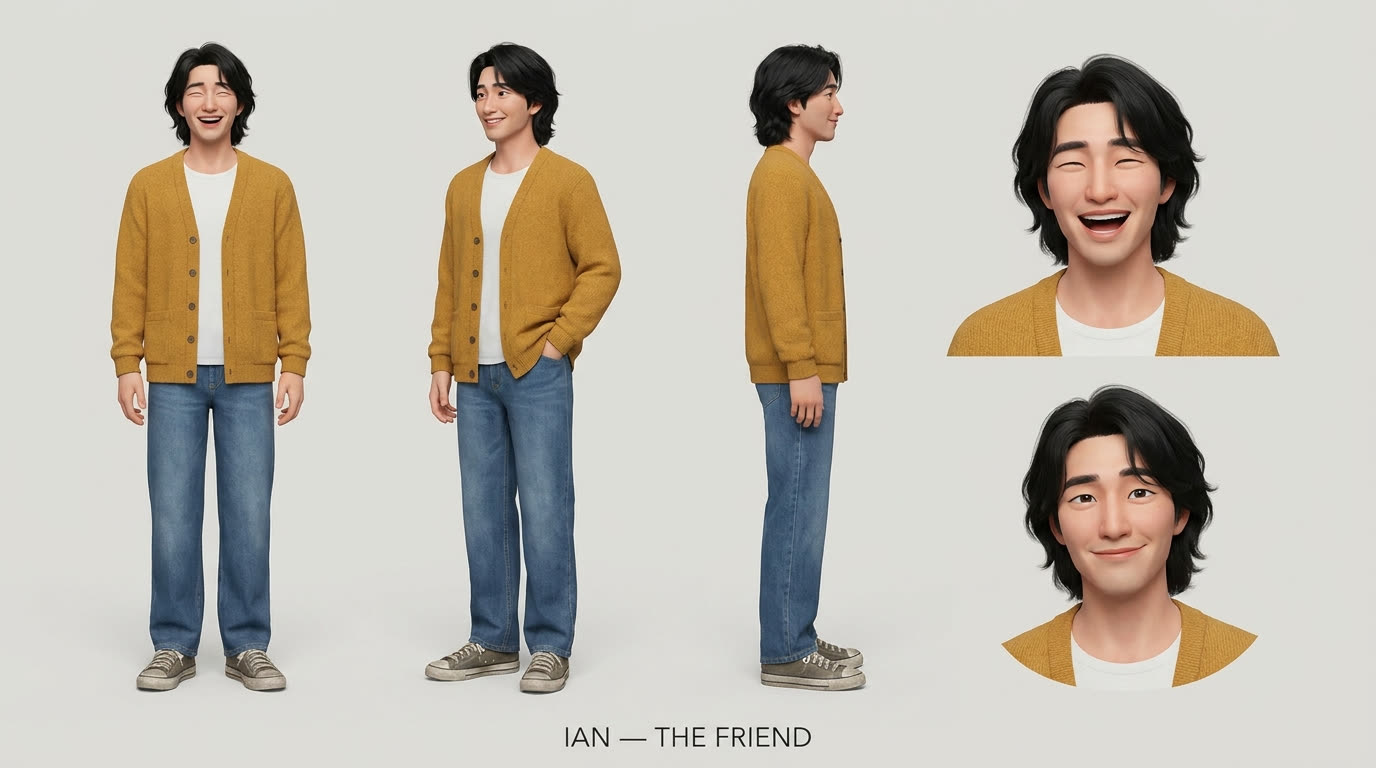
자연어 피드백 → 캐릭터 설명 수정 → 재생성 → 이전 버전은 사유와 함께 아카이브. "조던이 아니라 이안이야, 더 크고 한국인이야" 같은 한 마디가 곧 리비전입니다. 반복은 실패가 아니라 제작 과정 그 자체입니다.Plain-language feedback → edit the character description → regenerate → archive the old version with the reason. “It’s Ian, not Jordan — taller, Korean” is itself a revision. Iteration isn’t failure; it is the production process.
조연 '이안' — 영화에서 유일하게 말을 하는 인물이라, 시트가 곧 립싱크 장면의 기준이 됩니다.Supporting character Ian — the film’s only speaking role, so his sheet anchors the lip-synced scene.
STEP 3
이미지 — 무드보드와 20장의 키프레임Imagery — the mood board and 20 keyframes
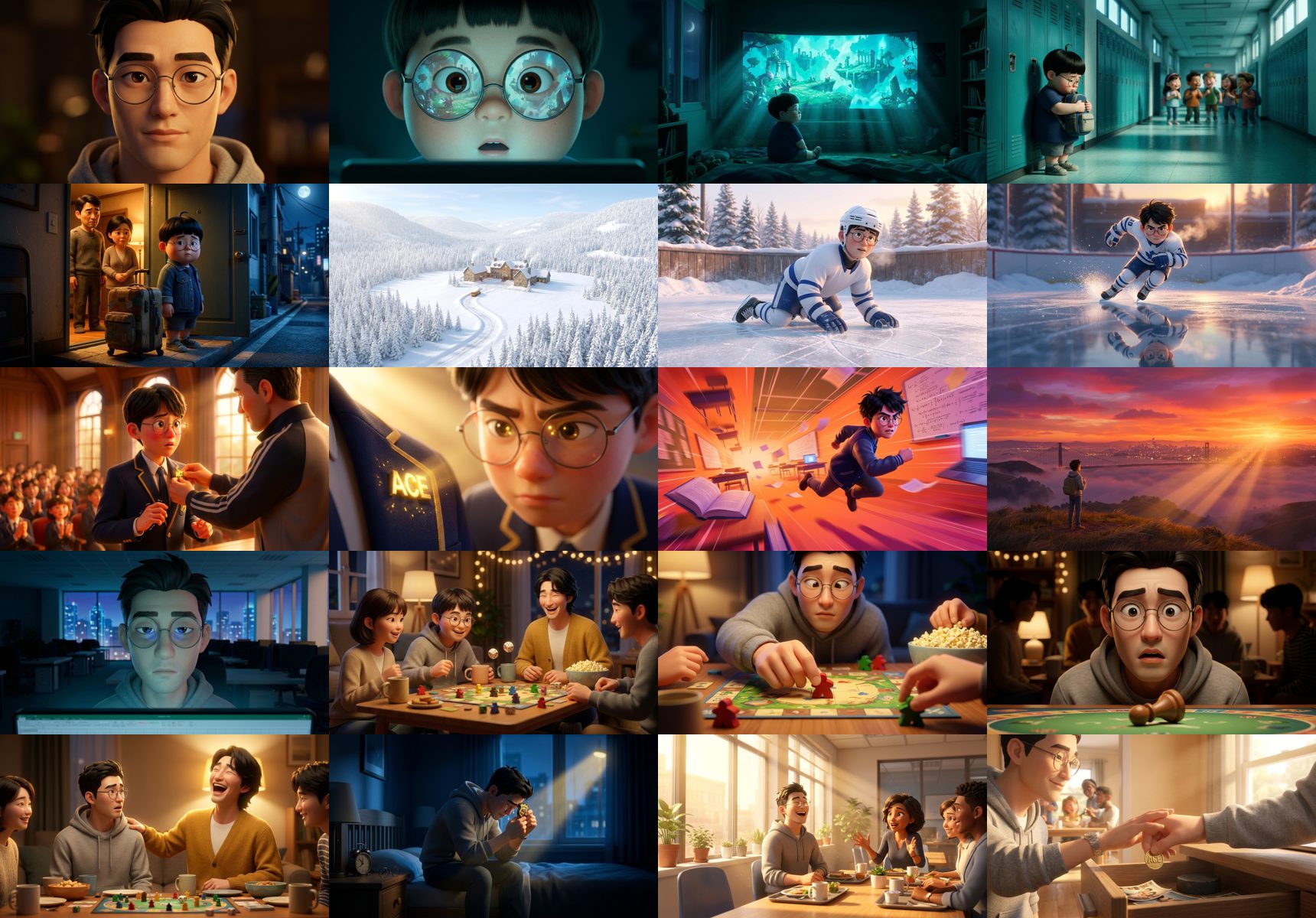
영상을 만들기 전에 영화 전체를 정지 이미지로 먼저 완성합니다. 감정 스테이션마다 무드 프레임 1장(7장), 그리고 20개 컷마다 시작 키프레임 1장. 이미지는 장당 2크레딧이라, 수십 번을 갈아엎어도 영상 1개 값이 안 됩니다.Before generating any video, finish the whole film as still images: one mood frame per emotional station (seven), then one start keyframe per shot (twenty). Images cost 2 credits each — you can redo them dozens of times for less than the price of a single video.
캐릭터 + 무드보드 콘택트 시트. 각 무드 프레임은 그 장(act)의 조명·팔레트 기준이 되어 키프레임 생성 때 레퍼런스로 첨부됩니다.Character + mood contact sheet. Each mood frame defines an act’s light and palette, then rides along as reference media for keyframe generation.20개 컷의 시작 키프레임 전부. 컬러가 이야기를 따라 흐릅니다 — 차가운 시안(도피) → 눈의 흰색(추방) → 골드(인정) → 다시 차가운 블루(공허) → 따뜻한 텅스텐(보드게임 밤) → 골든 모닝(해방).All 20 start keyframes. The color follows the story — cold cyan (escape) → snow white (exile) → gold (recognition) → cold blue again (emptiness) → warm tungsten (game night) → golden morning (release).스토리보드 시트 — 컷 번호·이름·액션·내레이션·정지 이미지가 한 장에. 이 시트가 곧 영화의 설계도입니다.The storyboard sheet — shot number, name, action, narration, and still on one page. This sheet is the film’s blueprint.
STEP 4
내레이션 — 목소리가 먼저다Narration — the voice comes first
처음엔 반대로 했다가 크게 배웠습니다. 영상 길이를 먼저 정해두고(컷당 3초) 내레이션을 구겨 넣었더니, 모든 문장이 1.3배속으로 압축돼야 했습니다. 픽사가 목소리를 먼저 녹음하고 그 위에 그림을 그리는 이유가 있었습니다.I did this backwards at first and learned the hard way. Fixing video lengths first (3s per shot) meant every line had to be time-squeezed by 1.3×. There’s a reason Pixar records the voices first and animates to them.
원칙 — Voice-firstPrinciple — voice-first
내레이션 확정 → 음성 생성 → 실제 음성 길이를 측정 → 그 길이가 각 컷의 영상 길이가 된다. 목소리를 늘리거나 줄이지 말 것. 영상이 목소리에 맞춘다.Finalize the script → generate the voice → measure each line’s real duration → that duration becomes the shot’s video length. Never stretch the voice. The picture serves the voice.
대본은 18줄. 초안을 쓴 뒤 윤문(humanize) 패스를 한 번 돌렸습니다 — 문어체 쉼표를 빼고("말을, 그대로" → "말을 그대로"), 입말로 바꾸는("친구들과" → "친구들이랑") 미세 조정 7건. 구조와 감정 곡선은 건드리지 않습니다.The script is 18 lines. After drafting, one humanize pass smoothed the written-Korean stiffness into spoken rhythm — seven particle-level adjustments, structure and emotional curve untouched.
C01 저는 한때, 죽고 싶을 만큼 불행했습니다.
C13 성공했는데… 왜 행복하지가 않을까.
C15 저도 모르게… 반칙을 했습니다.
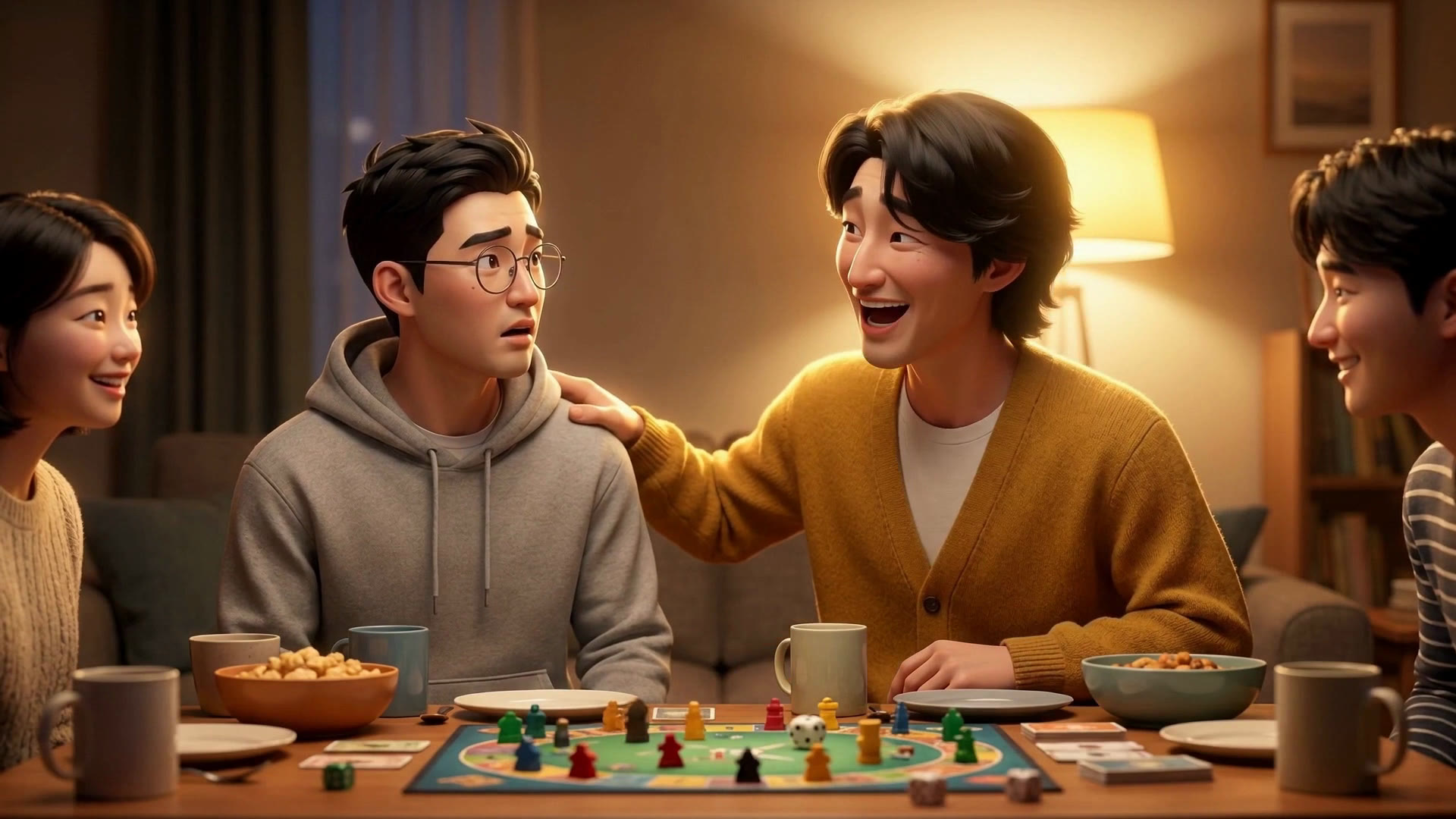
C17 [이안] "알렉스는 두 번 체크해야 돼~" ← 유일한 대사 (립싱크)the only dialogue (lip-synced)
C18 그날 밤, 펑펑 울었습니다.
C20 이제 저는 증명 대신, 사람들 곁에 있습니다.
STEP 5
보이스 클론 — 실패 두 번, 성공 한 번Voice cloning — two failures, one success
이 단계에서 가장 많이 헤맸고, 그래서 가장 공유할 게 많습니다.This is where I stumbled the most — which means it’s where the most useful lessons are.
시도Attempt
결과Result
유튜브 영상 오디오에서 클론 (BGM 섞인 압축 음원)Clone from YouTube video audio (compressed, BGM baked in)
❌ "이거 내 목소리가 전혀 아닌데?"❌ “This is not my voice at all.”
인스턴트 클론 + 감정 연기 모델(v3)로 톤 연출Instant clone + expressive model (v3) with acting tags
❌ 감정은 살았지만 정체성이 흔들림 — 연기하는 남, 내가 아님❌ Emotion appeared but identity drifted — an actor performing, not me
프로페셔널 클론(PVC) — 깨끗한 롱폼 녹음 104분으로 학습 + 안정적인 모델(multilingual v2) + 설정으로만 톤 제어Professional clone (PVC) — trained on 104 min of clean long-form recording + the stable model (multilingual v2) + tone via settings only
✅ 차분하지만 온전히 내 목소리✅ Calm, and fully me
최종 설정값 (다큐멘터리 톤다운)Final settings (toned-down documentary)
model: eleven_multilingual_v2
stability: 0.65–0.78 ← 높을수록 차분·진중higher = calmer, graver
style: 0.08–0.2 ← 낮을수록 담담lower = flatter, solemn
speed: 0.80–0.95 ← 느리게, 단 컷 길이 안에서slower, within each shot's window
학습 음원이 90%다. BGM 없는 무압축 솔로 녹음 30분 이상. 유튜브 업로드본은 안 됩니다 — 원본 녹음 파일을 쓰세요.The training audio is 90% of it. 30+ minutes of BGM-free, uncompressed solo speech. Not your YouTube uploads — use the raw recordings.
감정은 모델이 아니라 설정으로. 표현력 좋은 모델일수록 클론의 정체성을 느슨하게 잡습니다. 자기 목소리가 중요하면 안정적인 모델 + stability/style/speed 다이얼.Emotion via settings, not via model. The more expressive the model, the looser its grip on a clone’s identity. If sounding like yourself matters, use the stable model and dial stability/style/speed.
줄 사이 숨이 필요하다. 줄 간 0.9초, 감정 피크 뒤엔 1.2~1.4초. 이 '숨'이 편집의 절반입니다.Lines need breath between them. 0.9s between lines, 1.2–1.4s after emotional peaks. That air is half the edit.
STEP 6
샘플 영상 — 무조건 저해상도 먼저Sample video — always lowest resolution first
영상 크레딧은 이미지의 20배가 넘습니다. 그래서 철칙: 모든 영상은 480p 초저가 모드로 먼저 뽑고, 확인한 뒤에만 고해상도로 갑니다. 같은 5초가 프리뷰에선 7.5크레딧, 프로덕션(1080p)에선 45크레딧입니다.Video credits cost 20× images. Hence the iron rule: every shot renders first in cheap 480p fast mode; only confirmed shots graduate to high resolution. The same 5 seconds costs 7.5 credits in preview and 45 in production 1080p.
또 하나의 무기는 멀티씬 생성입니다. 연속된 장면은 컷을 나눠 따로 뽑지 않고, 한 번의 생성 안에 타임스탬프로 편집점을 지시합니다 — 인물과 조명이 컷을 넘어 이어지는 비결입니다.The other weapon is multi-scene generation: consecutive shots are generated as one clip with timestamped cut instructions inside the prompt — that’s how identity and lighting stay continuous across cuts.
[0-3.6s] Wide, static: four friends around a board game, dice tumble, laughter…
[3.6-6.85s] HARD CUT to insert: his hand slides a piece two spaces; a glance left, right…
[6.85-8.65s] HARD CUT to close-up: caught — his face freezes mid-breath…
[8.65-12s] HARD CUT to two-shot: his friend laughs and says in Korean, lip-synced:
"알렉스는 두 번 체크해야 돼~"
480p 프리뷰 컷 — 이 단계에서 스타일 드리프트, 얼굴 일관성, 타이밍을 전부 검증합니다. 여기서 통과해야 프로덕션 크레딧을 씁니다.The 480p preview cut — style drift, face consistency, and timing all get verified here, before a single production credit is spent.
STEP 7
파이널 — 1080p, 현장음, 립싱크Final — 1080p, ambience, lip-sync
프리뷰가 승인되면 같은 프롬프트·같은 레퍼런스로 1080p 표준 모드 재생성. 이번엔 네이티브 오디오를 켭니다 — 모니터의 웅웅거림, 새벽 빙판의 스케이트 날, 강당의 박수, 주사위 소리가 장면마다 함께 생성됩니다. 그리고 이안의 대사는 TTS가 아니라 영상 자체가 립싱크로 말합니다.Once the preview passes, the same prompts and references re-render in 1080p std mode — this time with native audio on: monitor hum, skate blades at dawn, auditorium applause, rolling dice, all generated per scene. And Ian’s line isn’t TTS — the video itself speaks it, lip-synced.
파이널 1080p 스틸 — 영화의 유일한 대사 순간. "알렉스는 두 번 체크해야 돼~"Final 1080p still — the film’s only spoken moment. “Alex has to check twice~”
마지막 믹스: 컷별 현장음을 내레이션 아래로 덕킹(-8dB), 이안의 대사 구간만 풀 볼륨, 전체를 -14 LUFS로 정리. 자막은 두 벌 — 영상에 굽는 버전과, 유튜브 업로드용 .srt.The final mix: per-shot ambience ducked −8dB under the narration, full volume only for Ian’s line, mastered to −14 LUFS. Subtitles ship two ways — burned-in, plus a .srt for YouTube.
내레이션 18줄 × 여러 버전 (ElevenLabs 구독) + TTS 실험 ~10cr18 lines × several versions (ElevenLabs subscription) + TTS experiments ~10cr
~10 cr
합계 (69초 영화 1편)Total (one 69-second film)
~1,020 cr
+ ElevenLabs Creator 플랜(월 $22, PVC 학습 포함). 재롤을 아꼈다면 절반으로도 가능합니다 — 비결은 위의 preview-first 원칙입니다.+ ElevenLabs Creator plan ($22/mo, includes PVC training). With fewer re-rolls this halves — the preview-first rule above is how.
기억할 다섯 가지Five things to remember
목소리가 먼저. 내레이션 길이가 영상 길이를 정한다. 반대로 하면 모든 문장이 압축된다.Voice first. Narration length defines video length. Backwards, every sentence gets crushed.
저해상도 먼저. 480p에서 전부 검증하고, 승인된 것만 1080p로. 크레딧의 대부분은 여기서 절약된다.Low-res first. Verify everything at 480p; only approved shots graduate to 1080p. This is where most credits are saved.
정체성 마커를 박아라. "동그란 안경 + 짙은 일자 눈썹" 같은 마커가 모든 프롬프트에 반복돼야 20컷 내내 같은 사람이다.Hard-code identity markers. “Round wire-rim glasses + thick straight brows” repeated in every prompt is what keeps one person across 20 shots.
감독 노트로 말하라. "턱선 더 샤프하게" 한 마디면 된다. 반복은 실패가 아니라 제작이다. 이전 버전은 사유와 함께 아카이브.Direct in plain language. “Sharper jawline” is enough. Iteration is production, not failure. Archive old versions with reasons.
전부 기록하라. 모든 생성의 프롬프트·설정·비용을 남기면, 어떤 컷이든 한 문장으로 다시 만들 수 있다.Record everything. Keep every generation’s prompt, settings, and cost — and any shot can be remade with one sentence.
직접 만들어 보세요Make your own
당신의 인생에도 '두 번 체크' 같은 순간이 있습니다. 영상 하나, 일기 한 편, 오래된 사진 한 장 — 원본은 뭐든 됩니다. 자세한 제작기는 유튜브 커리어해커 알렉스 채널에서 영상으로 공개합니다.Your life has a “check twice” moment too. One video, one diary entry, one old photo — any source works. The full video walkthrough is coming to my YouTube channel, Career Hacker Alex.